Home security used to mean choosing between a fortune spent on professional monitoring or relying on a barking dog. Not anymore. The market has shifted hard toward affordability without sacrificing the features that actually matter, motion detection, smartphone alerts, cloud storage, and integration with existing smart home gear. Whether someone’s renting an apartment, owns a starter home, or just refuses to drop a month’s pay on surveillance, there are solid, inexpensive systems that work. This guide breaks down what’s available, what to prioritize, and how to avoid the common pitfalls that turn a budget setup into a headache.
Table of Contents
ToggleKey Takeaways
- An inexpensive home security system can now deliver HD video, motion detection, and cloud storage for under $200 upfront with optional monitoring at $10–$20 per month.
- DIY wireless installation eliminates expensive technician fees and works well for most budget systems, requiring only adhesive mounts, basic tools, and a smartphone app for setup.
- Prioritize wireless connectivity with cellular backup, customizable motion zones, and smart home integration over gimmicks like facial recognition to maximize protection per dollar.
- Start with a base kit of sensors and one or two cameras, then expand during sales; this approach lets you identify coverage gaps before adding more components.
- Avoid common pitfalls like weak Wi-Fi coverage, hidden subscription fees, poor camera placement height (7–9 feet is ideal), and mixing incompatible ecosystems like Ring with Wyze.
- Pair your inexpensive home security system with visible deterrents like yard signs and window decals to create layered defense that discourages theft and intrusions.
Why Budget-Friendly Home Security Is More Accessible Than Ever
A few years ago, entry-level security meant a basic alarm panel and maybe a camera that recorded to a grainy VHS tape. Today’s affordable systems pack HD video, two-way audio, AI-powered motion detection, and cloud storage into devices that cost less than a decent cordless drill.
The shift comes down to three things: cheaper sensors, widespread Wi-Fi, and competition. Manufacturers like Ring, Wyze, and Blink flooded the market with sub-$100 cameras that actually work, forcing legacy players to drop prices or offer stripped-down packages. Wireless tech eliminated the need for expensive hardwired installations, and smartphone apps replaced proprietary control panels.
Professional monitoring, once a given with any system, is now optional. Many homeowners skip the monthly fee entirely and rely on self-monitoring through their phones. For those who want monitoring, prices have dropped to $10–$20 per month, a fraction of what traditional contracts demanded. The result is a landscape where a functional three-camera setup with motion alerts and cloud recording can cost under $200 upfront, with no ongoing fees if that’s the route someone chooses.
Top Affordable Home Security Systems Worth Considering
Not all budget systems are created equal. Here’s what stands out in 2026 without very costly.
Ring Alarm (2nd Gen) is a five-piece kit (base station, keypad, contact sensor, motion detector, range extender) that runs around $200. It integrates cleanly with Ring cameras and doorbells, and optional monitoring is $20/month with no contract. The system’s modular, so it’s easy to add sensors as needed.
Wyze Home Monitoring offers a starter kit for under $100 with a hub, keypad, two entry sensors, and a motion sensor. Monitoring costs $10/month, and Wyze cameras, already some of the cheapest on the market, pair seamlessly. The catch: customer support can be hit-or-miss.
SimpliSafe sits in the middle, with kits starting around $230. It’s one of the few budget systems with a solid track record for reliability and responsive monitoring. No contract required, and professional installation is available if DIY isn’t appealing.
Blink Outdoor cameras (4-pack around $150) work well for perimeter coverage. Battery-powered, weather-resistant, and compatible with Alexa. Not a full system, but a strong start for anyone who wants cameras first and sensors later.
Independent testing from home security reviewers consistently highlights these as strong performers at the low end of the price range. Each has quirks, Ring leans heavily into Amazon’s ecosystem, Wyze sacrifices some polish for price, but all deliver core functionality without the sticker shock.
DIY vs. Professional Installation: Which Saves You More?
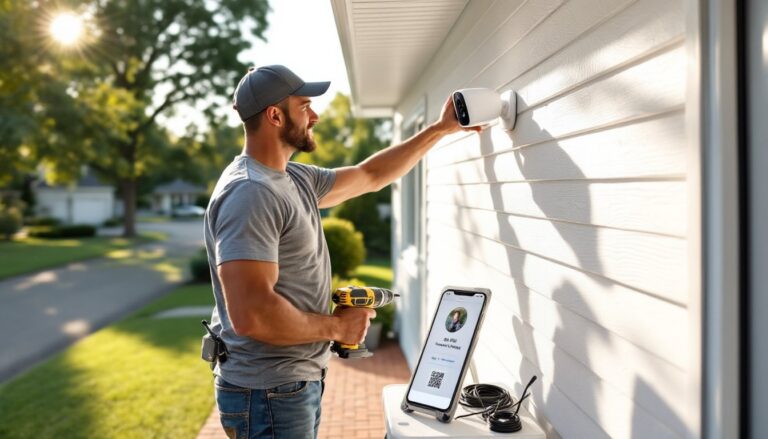
DIY installation isn’t just cheaper, it’s often simpler. Most wireless systems use adhesive mounts or a single screw, and pairing sensors to a hub takes minutes via an app. No need to schedule a technician, take time off work, or pay a $100+ installation fee.
DIY advantages:
- Zero installation cost
- Flexibility to reposition equipment
- Renter-friendly (no drilling required for most components)
- Immediate setup, no waiting for an appointment
When to consider professional help:
- Hardwired systems (rare in the budget category, but some exist)
- Complex camera wiring, especially PoE (Power over Ethernet) setups
- Multi-story homes where running cable through walls is necessary
- Lack of confidence with basic tools or Wi-Fi troubleshooting
For most budget systems, professional installation is overkill. The real time investment is in planning sensor placement, entry points, blind spots, and ensuring motion detectors cover high-traffic areas without triggering on pets. A well-thought-out DIY setup beats a hastily installed professional one.
If professional monitoring is in the mix, companies sometimes offer discounted or free installation as part of a contract. Read the fine print. Those deals often lock buyers into long-term agreements with early termination fees that erase any upfront savings.
Essential Features to Look for in Low-Cost Security Systems
Not every feature matters equally. Here’s what actually moves the needle on security, even in a tight budget.
Wireless connectivity (Wi-Fi or cellular backup): Wi-Fi is standard, but cellular backup keeps the system online if someone cuts internet service. It adds cost, but it’s worth it for serious protection.
Motion detection with customizable zones: Cheap cameras that alert for every leaf blowing by are useless. Look for systems that let users define detection areas, ignoring the street, flagging the driveway.
Two-way audio: Useful for deterring package thieves or checking in on kids. Found even on budget cameras under $100.
Local and cloud storage options: Cloud storage usually requires a subscription. Local storage (via microSD card or base station) is free but vulnerable if someone steals the device. Ideally, have both.
Battery backup: If power goes out, the system should stay armed. Most base stations have this: cameras are hit-or-miss.
Smart home integration: If someone already uses Alexa, Google Home, or Apple HomeKit, compatibility saves headaches. Voice arming/disarming and automation (e.g., lights on when motion detected) add value without extra hardware.
Easy app interface: A clunky app kills usability. Check reviews for mentions of lag, crashes, or confusing menus before buying.
Skip gimmicks like facial recognition on budget cameras, it’s unreliable and drains batteries. Focus on the basics done well.
Money-Saving Tips for Maximizing Your Security Setup
Getting the most protection per dollar comes down to strategy, not just picking the cheapest gear.
Start small, expand later. Buy a base kit with a few sensors and one or two cameras. Test coverage, identify gaps, then add components during sales. Black Friday and Prime Day often slash prices 30–40%.
Use wired power where possible. Battery-powered cameras are convenient but require recharging or battery swaps. Wired cameras (or solar panel add-ons) eliminate that hassle and often cost the same long-term.
Leverage existing hardware. An old smartphone can become a dedicated security camera using apps like Alfred or Manything. Not as polished as a purpose-built camera, but free is free.
Negotiate monitoring fees. Some companies offer discounts for annual prepayment or bundling with other services. Always ask.
DIY outdoor camera installation. Mounting a camera under an eave with a single screw and running a cable through a small drilled hole is straightforward. Saves $50–$100 per camera vs. professional mounting.
Pair security with visible deterrents. Yard signs, window decals, and even dummy cameras (controversial, but effective) make homes less appealing targets. Real cameras covering entry points plus a few visible deterrents create layered defense.
Check insurance discounts. Some insurers reduce premiums for monitored systems. Even a 5% discount on a $1,200 annual premium pays for monitoring in three years.
Reviews from experts testing DIY systems emphasize that thoughtful placement and configuration matter more than sheer device count.
Common Mistakes to Avoid When Buying Budget Security Equipment
Budget doesn’t mean careless. Here’s where people trip up.
Ignoring Wi-Fi requirements. Cheap cameras need strong, stable Wi-Fi. A router in the basement won’t reliably reach a driveway camera 60 feet away through two walls. A $30 Wi-Fi extender solves this but should be factored into upfront costs.
Skipping subscription fine print. “Free cloud storage” often means 24 hours of rolling footage. Anything beyond that requires a monthly fee. Understand what’s included before assuming it’s truly free.
Overlooking field of view. A 110° camera needs careful placement to cover a wide area. A 160° camera offers more flexibility. Spec sheets list this: use it when planning.
Mixing incompatible ecosystems. A Ring alarm won’t talk to a Wyze camera in any meaningful way. Stick with one ecosystem or accept managing multiple apps.
Mounting cameras too high or too low. Too high and faces blur. Too low and they’re easy to disable. Sweet spot is 7–9 feet, angled slightly downward.
Forgetting about weatherproofing. Indoor cameras are not outdoor cameras, even under a covered porch. Check IP ratings (IP65 or higher for true outdoor use).
Not testing before finalizing placement. Mount cameras with temporary adhesive or painter’s tape first. Walk the perimeter, check footage, adjust angles, then commit to screws or permanent mounts.
Relying solely on motion alerts. Notifications are great, but if nobody checks them or footage isn’t reviewed, the system is just decoration. Establish a routine, weekly footage checks, test sensors monthly, update firmware when prompted.
Anyone comparing options should consider how established systems like ADT packages or newer entrants like GE’s smart solutions balance cost and features. For broader context on what separates the best home security systems from the rest, understanding core functionality versus extras is critical. Even professional monitoring services have budget tiers worth evaluating. Exploring a range of home security system approaches helps clarify what’s actually needed versus what’s marketing fluff. Some homeowners find that comprehensive security strategies involve layering tech with physical deterrents, and even brands like Brinks offer entry-level options that compete on price.
Conclusion
Effective home security doesn’t require a second mortgage. Today’s budget systems deliver real protection with features that were premium-only a few years ago. The key is knowing what matters, wireless reliability, smart placement, and choosing gear that fits an existing ecosystem, and avoiding the traps that waste money without adding safety. Start with a solid base kit, test thoroughly, and expand as needed. With a little planning and honest assessment of needs, even a modest investment creates meaningful peace of mind.